name: Bug 反馈
description: 功能运行不正常 / 失效
body:
- type: markdown
attributes:
value: |
默认您已阅读 [Issues 须知](https://github.com/the1812/Bilibili-Evolved/blob/preview/doc/issue-rules.md)
请勿重复发起, 发之前记得看下[置顶问题 (Pinned issues)](https://github.com/the1812/Bilibili-Evolved/issues) (如果有的话), 以及[常见问题解答](https://github.com/the1812/Bilibili-Evolved/discussions/1301)
- type: textarea
id: feature
attributes:
label: 对应功能
description: |
(指本脚本的某项具体功能, 不是指 b 站的) 可以在设置中尝试开启 / 关闭某项功能来排查. 最好能附上功能的 Commit 值 (在设置里功能选项的底部).
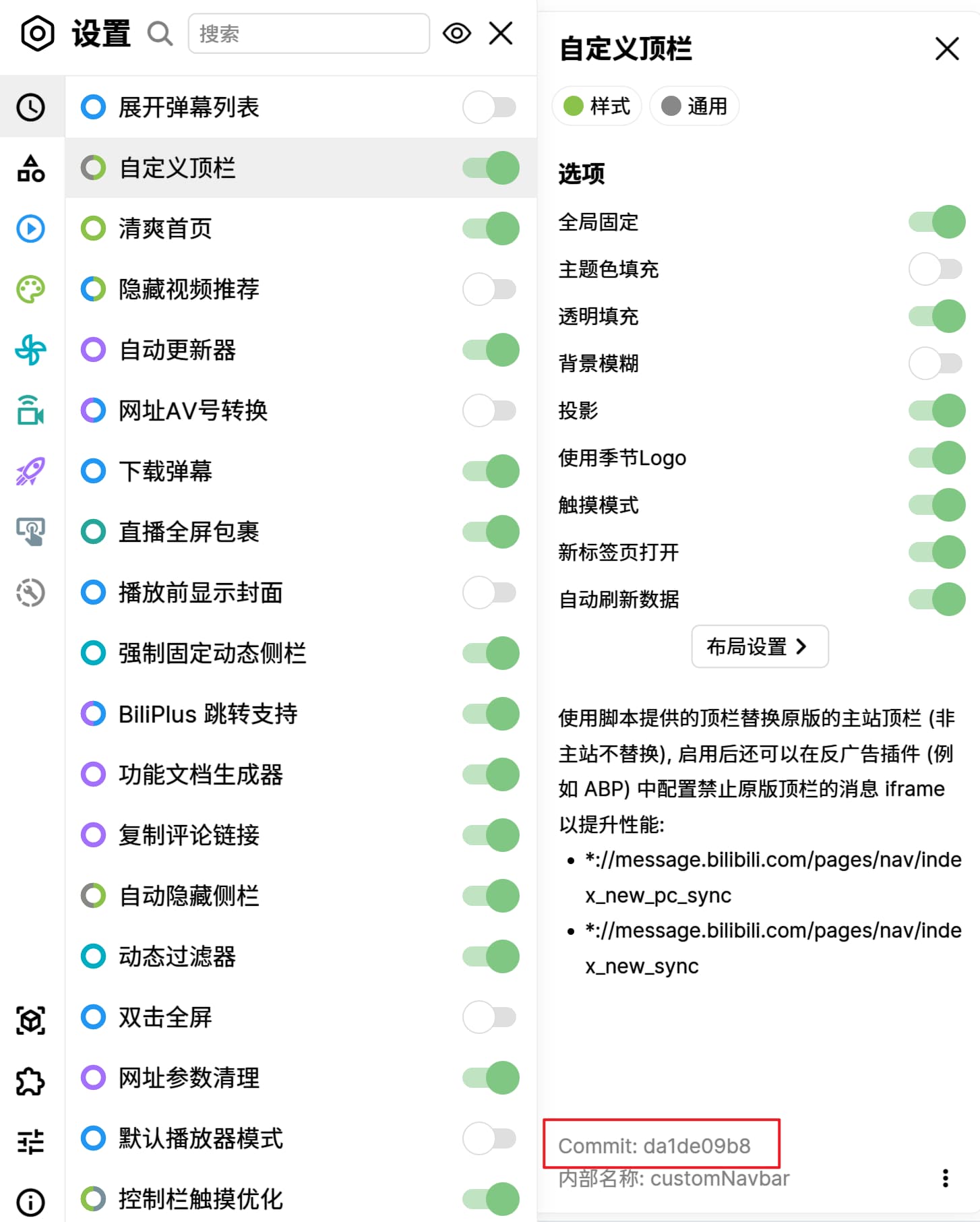 如果组件包含作者的信息 (by @xxx), 请在这里 at 他们
请注意: 以下功能已不再维护 (不再修复 bug 和添加新功能), 但是你仍然可以为其提供 Pull Request.
- 直播间自动抽奖
- 默认播放器模式
- 播放器置顶
- 播放器定位
placeholder: 请输入
validations:
required: true
- type: textarea
id: description
attributes:
label: 问题描述
description: 如何重现此问题, 在哪个页面里出现这个问题, 比如视频相关的可以提供一下 av / BV 号
placeholder: 请输入
validations:
required: true
- type: input
id: script-version
attributes:
label: 脚本版本
description: 可在设置面板的关于弹窗中找到脚本版本信息
placeholder: 请输入
validations:
required: true
- type: input
id: script-manager-version
attributes:
label: 脚本管理器及版本
description: 例如 Tampermonkey v4.19.6176
placeholder: 请输入
validations:
required: true
- type: input
id: browser-version
attributes:
label: 浏览器及版本
description: 可在浏览器的关于页面中找到浏览器版本信息
placeholder: 请输入
validations:
required: true
- type: input
id: player-version
attributes:
label: 播放器版本
description: |
在 b 站播放器上右键可以看到播放器版本号
placeholder: 请输入
validations:
required: true
- type: dropdown
id: player-codec
attributes:
label: 播放策略
description: 在 b 站播放器设置 - 更多播放设置 里可以看到播放策略
options:
- 默认
- AV1
- HEVC
- AVC
validations:
required: true
- type: textarea
id: logs
attributes:
label: 错误信息
description: |
脚本直接报告的错误信息, 或者浏览器开发者工具 (F12 或 Ctrl+Shift+I 召唤) 里 Console / 控制台 一栏的输出, 太长的话可以截图放下面.
如果组件包含作者的信息 (by @xxx), 请在这里 at 他们
请注意: 以下功能已不再维护 (不再修复 bug 和添加新功能), 但是你仍然可以为其提供 Pull Request.
- 直播间自动抽奖
- 默认播放器模式
- 播放器置顶
- 播放器定位
placeholder: 请输入
validations:
required: true
- type: textarea
id: description
attributes:
label: 问题描述
description: 如何重现此问题, 在哪个页面里出现这个问题, 比如视频相关的可以提供一下 av / BV 号
placeholder: 请输入
validations:
required: true
- type: input
id: script-version
attributes:
label: 脚本版本
description: 可在设置面板的关于弹窗中找到脚本版本信息
placeholder: 请输入
validations:
required: true
- type: input
id: script-manager-version
attributes:
label: 脚本管理器及版本
description: 例如 Tampermonkey v4.19.6176
placeholder: 请输入
validations:
required: true
- type: input
id: browser-version
attributes:
label: 浏览器及版本
description: 可在浏览器的关于页面中找到浏览器版本信息
placeholder: 请输入
validations:
required: true
- type: input
id: player-version
attributes:
label: 播放器版本
description: |
在 b 站播放器上右键可以看到播放器版本号
placeholder: 请输入
validations:
required: true
- type: dropdown
id: player-codec
attributes:
label: 播放策略
description: 在 b 站播放器设置 - 更多播放设置 里可以看到播放策略
options:
- 默认
- AV1
- HEVC
- AVC
validations:
required: true
- type: textarea
id: logs
attributes:
label: 错误信息
description: |
脚本直接报告的错误信息, 或者浏览器开发者工具 (F12 或 Ctrl+Shift+I 召唤) 里 Console / 控制台 一栏的输出, 太长的话可以截图放下面.
 render: Shell
placeholder: 请输入
validations:
required: true
- type: textarea
id: screenshots
attributes:
label: 附加截图
placeholder: 可在此粘贴图片
- type: textarea
id: kind_reminder
attributes:
label: 致遇到了相同问题准备回复的人
description: 请勿修改文本框中的内容
value: |
**太长不看**:
1、遇到了相同的问题:**请用左下角的 reaction 点赞**
2、实时关注该 Issue 的后续进展:**请用 Issue 页上的 Subscribe 功能**(在 PC 端按钮通常位于页面右侧)。
**_请您回复前务必确认您有在本 Issue 之外补充了其它相关信息(比如 Log)再行回复以免对他人造成不必要的困扰_**
render: Shell
placeholder: 请输入
validations:
required: true
- type: textarea
id: screenshots
attributes:
label: 附加截图
placeholder: 可在此粘贴图片
- type: textarea
id: kind_reminder
attributes:
label: 致遇到了相同问题准备回复的人
description: 请勿修改文本框中的内容
value: |
**太长不看**:
1、遇到了相同的问题:**请用左下角的 reaction 点赞**
2、实时关注该 Issue 的后续进展:**请用 Issue 页上的 Subscribe 功能**(在 PC 端按钮通常位于页面右侧)。
**_请您回复前务必确认您有在本 Issue 之外补充了其它相关信息(比如 Log)再行回复以免对他人造成不必要的困扰_**
完整版
由于每个 Issue 甚至整个项目都是可以订阅通知的, 对于已经有人汇报过的 Bug, 如果您也遇到了并且没有其他信息要补充, 可以直接在左下点个赞表示 +1, 不要再去新增评论。想关注后续的可以用 Subscribe,Subscribe 之后该 Issue 如果有变动都可以收到通知,如果不想被回复打扰可以使用更加进阶的 Customize 功能,勾选 "Closed" & "Reopened"。Closed 通常代表该 Issue 已被解决,极少数情况下的 Reopened 代表该 Issue 的问题重新出现。如果您新增了无意义评论,因为 Issue 这个 bug tracker 与邮件列表类似,订阅某个 Issue 的用户会在每次这个 Issue 有新的动态时收到一封新的提醒邮件。也就是说,在 Issue 中的一个不能提供新的信息的评论,相当于给所有订阅这个 Issue 的用户发了一封垃圾邮件(spam)。尤其项目的维护者也是订阅者中的一员,太多垃圾邮件会对维护者带来很多不必要的困扰。发送垃圾邮件在开源社区通常是不那么受欢迎的行为。